What you’ll need # A Copilot+ PC with a qualifying NPU (Snapdragon X, Intel Core Ultra 200V or later, or Ryzen AI 300 or later) Windows 11 version 24H2 or 25H2 The August 2026 cumulative update (KB5101684) installed A restart after the update — the Settings page often does not appear until after reboot If you are on a standard laptop or desktop without a Copilot+ NPU, the AI components page will likely not appear or will list nothing removable.
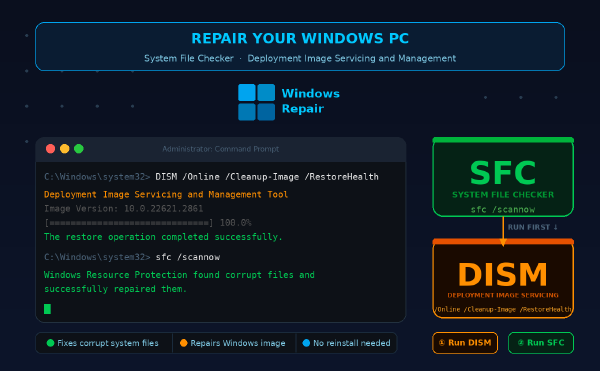
What you’ll need # Windows 10 (build 1809 or later) or Windows 11 Administrator account access Active internet connection for DISM repair source Basic understanding of PowerShell or Command Prompt 10-30 minutes depending on system state Overview # This guide walks you through repairing corrupted Windows system files using System File Checker (SFC) and Deployment Image Servicing and Management (DISM). You’ll fix files causing crashes, boot failures, or missing DLLs without reinstalling Windows.
What you’ll need # Windows 10 (build 19041+) or Windows 11 (any build) UEFI firmware with Secure Boot enabled Administrator account access Basic understanding of PowerShell and Windows Update 500 MB free disk space for certificate updates Active internet connection for Windows Update Overview # Microsoft is deprecating older Secure Boot certificates in June 2026, requiring all Windows users to update their boot security certificates. This guide walks you through checking your current certificate status and installing the updated certificates to maintain system security and avoid boot failures.
What you’ll need # Windows 11 version 23H2 or later (build 22631+) Administrator privileges on your Windows account PowerShell 5.1 or later (built into Windows 11) Basic familiarity with PowerShell and Windows Registry Windows 11 Pro or Enterprise for Group Policy features (Home users can use Registry edits) Overview # This guide disables Windows 11’s AI-powered features including Recall snapshots, Copilot assistant, and background telemetry services. You’ll reduce resource usage, improve privacy, and remove taskbar clutter while maintaining system stability.